Skip to content
Engineering Consultancy Web Apps

One System to Run
The Whole Practice.

Most engineering consultancies run on a pile of tools that were never meant to meet: timesheets in one subscription, projects in a second, leave in a spreadsheet, invoices in the accounting package, car keys on a hook by the door, and approvals in somebody's inbox. Every one of them charges per user per month, none of them talk to each other, and the gaps between them are filled by an office manager re-typing the same numbers.

We specialise in replacing that stack with one web app built around how your practice actually operates. Staff log hours against real project phases, that time flows straight into progress claims and payroll, leave and approvals follow your delegation rules, and the directors get utilisation and profitability by project without waiting until month end. You pay to build it once, you own the code and the data, and adding your twentieth or fiftieth engineer does not increase the licence bill — because there is no licence.

Per-user licence fees
None
First module live in
Weeks, not years
Code & data ownership
Yours

What does a custom web app for an engineering consultancy do?

A custom engineering consultancy web app replaces multiple separate subscriptions with a single system covering timesheets, project and budget tracking, client and tender records, invoicing and progress claims, leave requests, multi-level approvals, expense claims, document registers, plant and pool-vehicle bookings, and compliance records such as licence and insurance expiry. Designie, a Sydney studio led by a project manager and engineer working in the engineering consultancy industry, builds these as bespoke platforms — the firm owns the code, the data and the hosting, with no per-user licence fees.

Before / After

7 subscriptions. One practice.

  • Timesheet appper user / month
  • Project & job trackerper user / month
  • HR & leave platformper user / month
  • Expense claims appper user / month
  • Fleet booking toolper vehicle / month
  • Document managerper user / month
  • Spreadsheets & inbox approvalspaid for in admin hours

Your platform

One system. Every module. Yours.

  • One login for every module
  • One dataset — nothing re-keyed
  • No per-seat licence, ever
  • You own the code and the data

The Interface

What It Actually Looks Like

Three screens from a practice platform of this kind: what a principal sees on Monday morning, what an engineer fills in on Friday afternoon, and what a project manager opens before a client call. Your build is designed around your own workflow and branding — these show the shape of it.

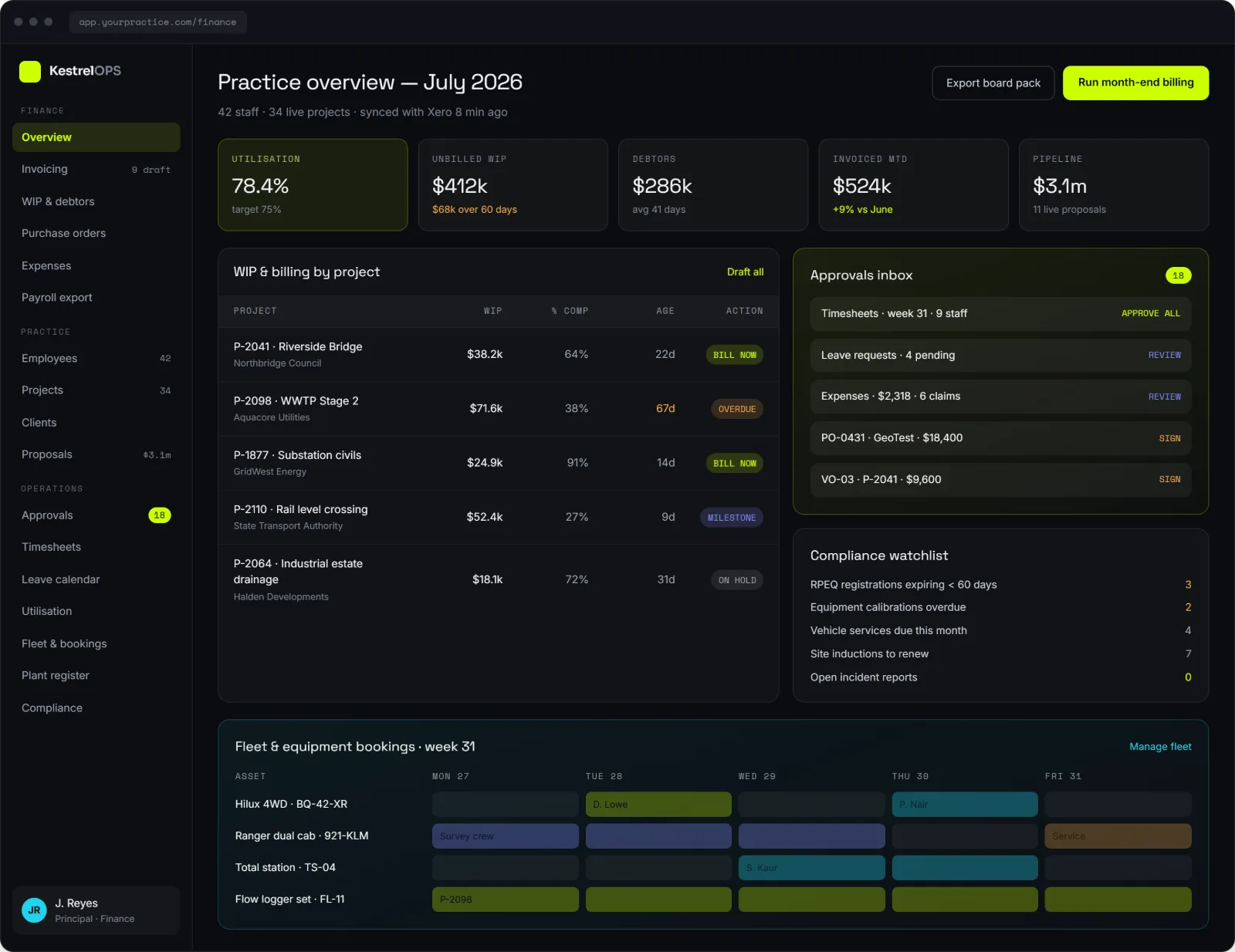
Engineering consultancy practice management dashboard showing utilisation, unbilled WIP, debtors, an approvals inbox, a compliance watchlist and a weekly fleet and equipment booking calendar

Practice overview

Utilisation, unbilled WIP, debtors, invoiced month-to-date and live pipeline on one screen, with the approvals inbox, compliance watchlist and fleet bookings beside them. These are the numbers most directors currently wait until month end to see.

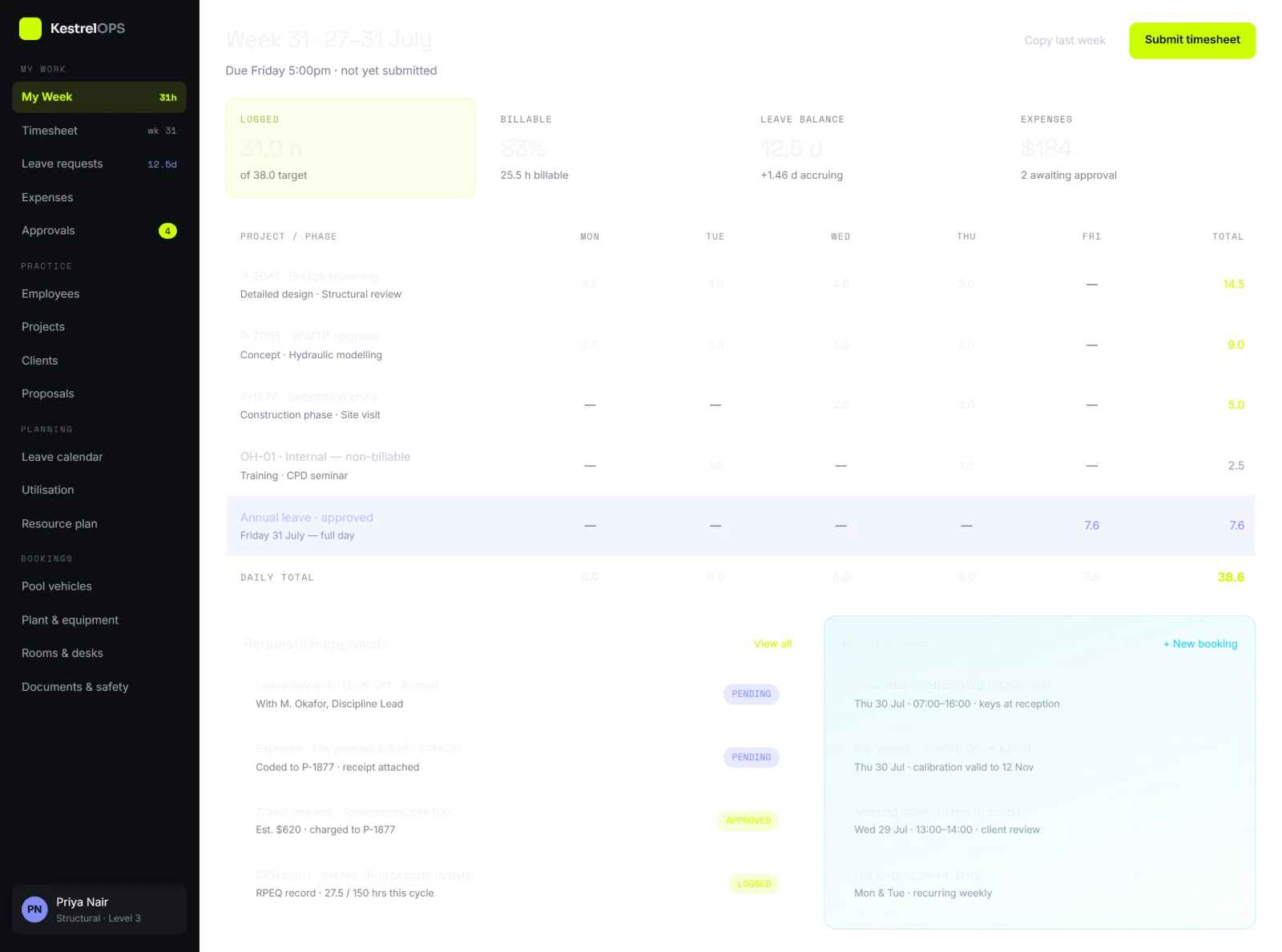
Weekly timesheet screen for an engineering consultancy showing hours entered by project and phase, billable percentage, leave balance, pending expense and travel approvals, and pool vehicle bookings

Weekly timesheet

Hours logged against project and phase, with approved leave, expense claims, travel requests and equipment bookings on the same screen. How fast this screen is decides whether staff keep timesheets current — which is why everything downstream depends on it.

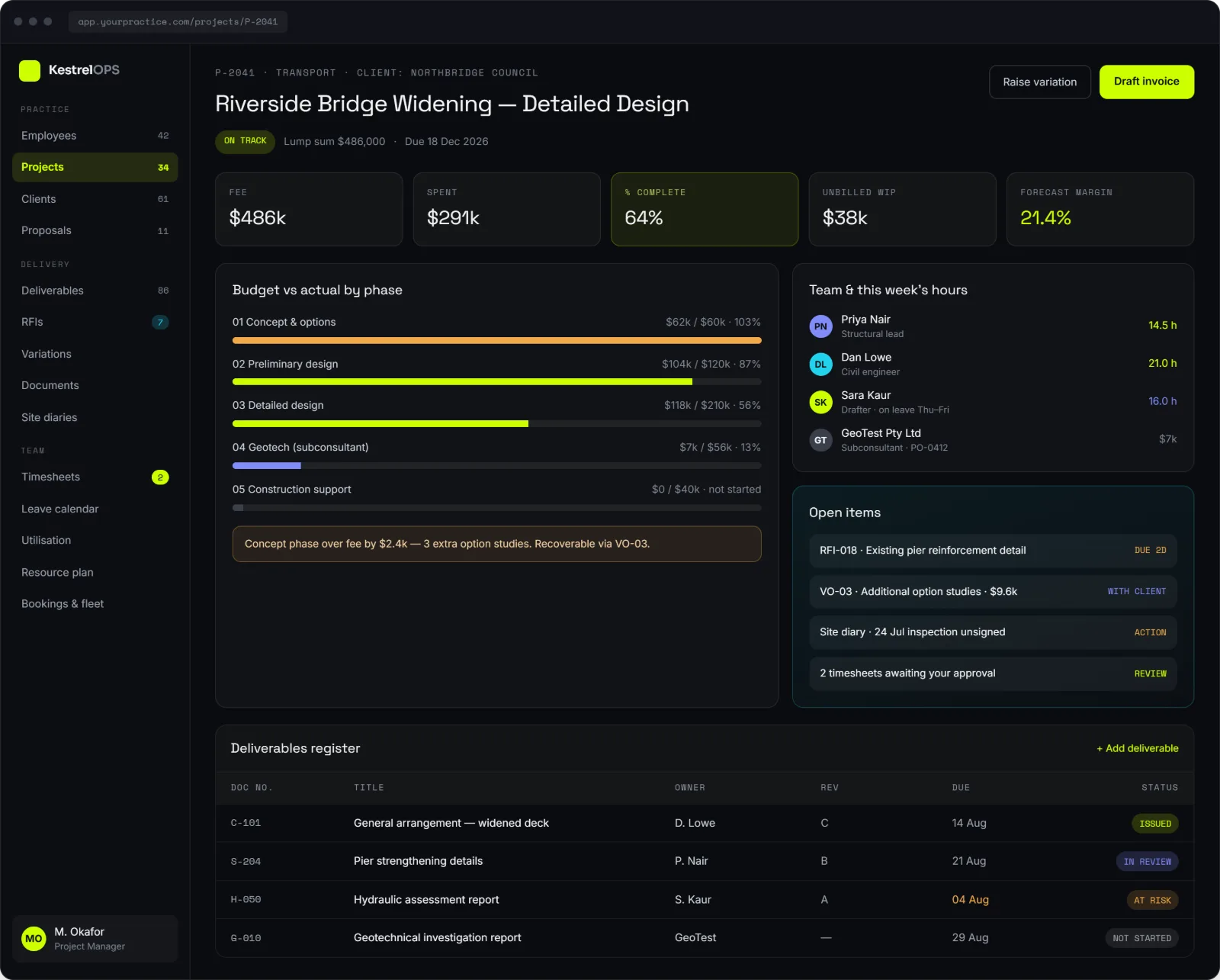
Engineering project dashboard showing fee versus spend, forecast margin, budget versus actual by project phase, team hours, open RFIs and variations, and a deliverables register with revision status

Project detail

Fee, spend, percentage complete, unbilled WIP and forecast margin, then budget versus actual for every phase including subconsultants. Open RFIs and variations sit next to the deliverables register with revision and issue status.

Illustrative interface concepts with sample data. Not a live client system, and the firms, projects and figures shown are fictional.

Why It Works

Stop Paying Per Head

Per-seat subscriptions punish you for growing. A platform you own costs what it costs to build, then serves your whole team — including casuals, graduates and subconsultants — at no extra licence cost.

One Record, Not Six

A job number is entered once and follows the work all the way through: timesheet, budget, variation, invoice and report. No exports, no re-keying, no month-end reconciliation between systems that disagree.

Built for How Engineers Work

Phases and disciplines, fee budgets, checking and verification sign-off, site visits, RFIs and revision-controlled drawings. Generic business software has no concept of any of it.

Real Numbers, Live

Utilisation, write-offs, budget burn and profitability by project, updated as timesheets are entered — not assembled in a spreadsheet three weeks after the month closes.

The Menu

What We Can Build Into It

Every practice is different, so nothing here is compulsory — this is the menu we work from during discovery. Most firms start with the two or three modules causing the most pain, then extend once the platform is live and staff trust it.

12
Modules to choose from
85
Individual capabilities
0
Per-seat licence fees

Timesheets & Time Capture

7 capabilities

  • Daily or weekly entry against project, phase, discipline and task
  • Billable vs non-billable split, with charge-out rates per grade
  • Overtime, TOIL, RDO and penalty-rate handling
  • Mobile and site entry, including offline capture
  • Automatic reminders for missing or late timesheets
  • Project manager review, adjustment and approval workflow
  • Locked periods once a timesheet is approved or invoiced

Projects & Job Management

7 capabilities

  • Project register with job numbers, phases, disciplines and status
  • Fee budget vs actual, hours burn and percentage complete
  • Variation and scope-change register with client approval trail
  • Milestone and program tracking with Gantt view
  • Resource allocation and forward capacity planning
  • Subconsultant scopes, commitments and back-to-back terms
  • Project close-out checklists and lessons-learned records

Clients, Tenders & CRM

6 capabilities

  • Client and contact database with full interaction history
  • Opportunity and tender pipeline with probability weighting
  • Fee proposal builder using your templates and rate schedules
  • Won/lost tracking and conversion reporting by sector or client
  • Client portal for issuing documents and collecting approvals
  • Repeat-client and referral reporting

Invoicing & Financials

9 capabilities

  • Progress claims and invoices generated straight from approved time
  • Percentage-of-fee, milestone, lump-sum and do-and-charge billing
  • Retainer and recurring invoice automation
  • Disbursements and on-charges (travel, printing, plotting, testing)
  • Purchase orders and subconsultant invoice matching
  • Accounts receivable, aged debtors and automated payment reminders
  • WIP, write-on/write-off and revenue recognition tracking
  • GST and BAS-ready exports, plus Xero or MYOB sync
  • Cash-flow forecasting by project and by month

Leave & People

7 capabilities

  • Annual, personal, long service, parental, RDO and unpaid leave requests
  • Live balances and accruals visible to the employee before they apply
  • Team leave calendar showing coverage clashes before approval
  • Employee directory with roles, grades, rates and emergency contacts
  • Onboarding and offboarding checklists with asset handover
  • Licence, registration and CPD tracking (CPEng, NER, RPEQ, white card, driver licence) with expiry alerts
  • Performance review cycles and goal tracking

Approvals & Workflow

7 capabilities

  • Configurable multi-level approval chains per request type
  • Delegation limits by role and dollar value
  • Automatic escalation and delegate-while-on-leave rules
  • Approve or reject from email, mobile or the dashboard
  • Expense claims with photo receipt capture and reimbursement tracking
  • Purchase and subconsultant engagement approvals
  • Complete audit trail of who approved what, when and on what basis

Fleet, Plant & Equipment

8 capabilities

  • Pool vehicle booking calendar with conflict checking and key handover
  • FBT-compliant logbooks and per-trip kilometre records
  • Registration, insurance, servicing and inspection reminders
  • Pre-start and damage checks with photos at pickup and return
  • Fuel card and running-cost tracking per vehicle
  • Booking of survey and test equipment — total stations, GPS, data loggers, laptops
  • Calibration certificates and next-due-date tracking
  • Charge equipment and vehicle use back to the project that used it

Documents & Deliverables

7 capabilities

  • Document register with revision control and issue history
  • Drawing, report and calculation transmittals with receipt tracking
  • RFI register and response tracking
  • Checking and verification sign-off — designer, checker, approver
  • Templated report and letter generation using project data
  • Site inspection reports with photos captured on a phone
  • Searchable archive that survives staff turnover

Safety, Quality & Compliance

7 capabilities

  • SWMS and JSA register with site-specific versions
  • Incident, near-miss and hazard reporting with follow-up actions
  • Toolbox talk records and attendance
  • Professional indemnity and public liability certificate register
  • Subconsultant and contractor insurance expiry tracking
  • ISO 9001 quality records and internal audit evidence
  • Induction records per site and per client

Reporting & Dashboards

7 capabilities

  • Director dashboard — utilisation, WIP, debtors, pipeline, profitability
  • Project manager view — budget burn, team hours, upcoming milestones
  • Engineer view — my projects, my hours, my leave, my approvals
  • Utilisation and realisation rates by person, team and office
  • Profitability by project, client, sector and service line
  • Custom saved reports with scheduled email delivery
  • One-click export to Excel and PDF for board packs

Integrations & Access

7 capabilities

  • Microsoft 365 or Google Workspace single sign-on
  • Xero, MYOB and QuickBooks synchronisation
  • Payroll exports in your provider’s format
  • SharePoint, OneDrive or network-drive document linking
  • Outlook and Google Calendar sync for leave and bookings
  • Email and in-app notifications with per-user preferences
  • API access so future tools can plug into the same data

Security & Administration

6 capabilities

  • Role-based access control down to individual fields
  • Separate access levels for directors, staff, admin and subconsultants
  • Full audit logging of every create, edit and delete
  • Australian-hosted data with automated encrypted backups
  • Configurable rates, roles, leave rules and approval chains — no developer needed
  • Staff self-service for details, bank information and emergency contacts

Not every module suits every practice. Tell us how your firm runs and we'll tell you which ones are worth building first.

Wisam Tozah, founder of Designie

Wisam Tozah

Founder, Designie — project manager and engineer in engineering consultancy

Who Builds It

Built by someone who actually runs the projects

Designie is run by Wisam Tozah — a project manager and engineer working in the engineering consultancy industry. The platform comes from having filled in the timesheets, chased the variation that never got billed and waited on an approval sitting in somebody’s inbox. You won’t spend the first six weeks explaining what a fee phase is.

  • Day-to-day experience of consultancy delivery, not just software
  • Speaks in job numbers, phases, fee budgets and progress claims
  • Knows which workflows staff quietly work around, and why
  • Scoping starts at the detail, not at the glossary

The Subscription Stack Is Costing More Than You Think

Add up what a mid-sized consultancy pays per user per month across a timesheet tool, a project tool, an HR and leave platform, an expense app, a fleet booking system and a document manager. Then add the invisible cost: the admin hours spent moving data between them, the month-end reconciliation, the reports that have to be rebuilt in Excel because no single system holds the whole picture, and the licences you keep paying for staff who left. A platform you own removes the recurring per-seat bill and the manual glue at the same time — and the payback usually shows up in admin hours before it shows up in the subscription line.

  • One build cost instead of a per-user bill that grows with headcount
  • No paying twice for the same data to live in two systems
  • Admin time returned to billable or genuinely useful work
  • No vendor price rise, forced migration or feature removal you did not choose

Built Around Engineering Work, Not Generic Business Work

Off-the-shelf business software models a company as staff, tasks and invoices. An engineering consultancy is not that shape. Work is organised by job number, phase and discipline. Fees are budgeted per phase and burned by grade. Deliverables need a designer, a checker and an approver before they leave the building. Site visits need a vehicle, a licence check and an induction record. Variations have to be captured the day they happen or they never get billed. We build the system around those realities rather than asking your engineers to bend their workflow into somebody else’s data model.

  • Job numbers, phases and disciplines as first-class concepts
  • Fee budgets and charge-out rates by grade, not a flat hourly figure
  • Design check and verification sign-off built into the deliverable flow
  • Variations captured at the point of work so they actually get invoiced
  • Field-friendly screens that work on a phone at a site with poor reception

Delivered in Stages, Not as a Two-Year Project

The fastest way to fail at this is to try to replace everything at once. We start with a discovery workshop that maps your current tools, spreadsheets and workarounds, then identify the module causing the most pain — usually timesheets, because everything downstream depends on it. That goes live first, with your real data in it, while the rest of the stack keeps running. Each subsequent module lands on a platform your staff already use and trust, so adoption is incremental rather than a single disruptive switchover.

  • Discovery workshop and a written scope before anything is built
  • Highest-pain module first, in production with real data
  • Existing systems run in parallel until each module is proven
  • Migration of historical projects, clients, staff and timesheet records
  • Role-specific training and documentation at each release

You Own It — Code, Data and Infrastructure

The platform is deployed to hosting in your firm’s name, under your accounts. You get the source code and the database. If you want another developer to extend it in three years, they can. If you want to bring it in-house, you can. This matters more in engineering than in most industries: your project records, calculations and correspondence carry a professional liability tail measured in years or decades, and none of that should live somewhere you can lose access to because a vendor changed its pricing, was acquired, or shut down.

What's Included

  • Discovery workshop mapping your current tools, spreadsheets and workarounds
  • Technical architecture, database design and role/permission model
  • Every module below, built and configured to your practice
  • Migration of existing project, client, staff and timesheet history
  • Integrations with your accounting, payroll and Microsoft 365 environment
  • Role-based dashboards for directors, project managers, engineers and admin
  • Deployment on infrastructure in your name, with backups and monitoring
  • Training sessions and written documentation for each staff role
  • Post-launch support and an agreed path for future modules

Key Facts

Service
Custom web app development for engineering consultancies
Location
Sydney, New South Wales, Australia
Built by
A project manager and engineer working in the engineering consultancy industry
Replaces
Separate timesheet, project, HR, fleet and approval subscriptions
Core modules
Timesheets, projects, clients, finance, leave, approvals, fleet, compliance
Licensing
No per-user fees — the firm owns the platform outright
Code ownership
Client owns the code, data and infrastructure
Integrations
Xero, MYOB, Microsoft 365 / SSO, payroll and accounting exports
Access control
Role-based — director, project manager, engineer, admin, subconsultant
Delivery approach
Staged — the highest-pain module first, then build out
Payment terms
50% deposit, 50% on completion
Contact
info@designie.com.au

Common Questions

What software do engineering consultancies use to run timesheets and projects?

Most Australian engineering consultancies run some combination of an off-the-shelf practice management product, a separate timesheet or project tool, an accounting package such as Xero or MYOB, an HR or leave platform, and a set of spreadsheets covering whatever the other systems do not. Larger firms buy an integrated practice management suite; smaller ones assemble a stack of per-user subscriptions. The third option is a custom web app built for the one firm, which covers the same ground without per-seat licensing and without the gaps between separate systems.

How long does it take to build?

The first module — usually timesheets — is typically live in weeks rather than months, because it is scoped deliberately narrow and runs alongside your existing tools. A full platform covering projects, invoicing, leave, approvals and fleet is built out in stages after that, at a pace set by how quickly your team adopts each release. We scope each stage individually so you are never committing to an open-ended build.

Do we need an IT person to run it?

No. It runs in the browser on hosting we set up in your firm’s name, with automated backups and monitoring. Day-to-day configuration — charge-out rates, roles, leave rules, approval chains, new project types — is designed to be changed by your admin or office manager without touching code. We handle the technical maintenance under a support arrangement, and because you own the code you are free to move that to anyone else.

Is this SaaS, or a web app, or something else?

It is a custom web app — sometimes called a practice management platform or an internal business system. It runs in the browser, so there is nothing to install and your team reaches it from the office, home or site. It is deliberately not SaaS: software as a service means renting a shared product from a vendor on a per-user subscription, which is the arrangement this replaces. Here the platform is built for your firm alone, and you own it the way you would own any other business asset.

How is this cheaper than just paying for subscriptions?

It is a build cost up front against a recurring per-user cost forever. The maths depends on your headcount and how many tools you are paying for — a three-person practice is usually better off with subscriptions, and a firm of twenty-plus across several systems usually is not. Add the admin hours currently spent moving data between systems and the crossover point comes sooner than most directors expect. We will do that calculation honestly with you in discovery, including telling you if you are better off staying where you are.

Do we have to replace everything at once?

No, and we would advise against it. We usually start with the single module causing the most pain — most often timesheets, since invoicing, utilisation and payroll all depend on it — get it live with real data, then extend. Your existing tools keep running until each replacement is proven.

Can it integrate with Xero or MYOB?

Yes. Both have well-supported APIs, so approved invoices, purchase orders and payroll data can flow through without re-keying. We can also sync with Microsoft 365 for single sign-on and calendar integration, and link documents held in SharePoint or OneDrive rather than duplicating them.

What about our existing data?

Migration is part of the project. We bring across projects, clients, staff records and historical timesheet and invoice data so reporting still works across the changeover. Where data lives in spreadsheets, we clean and import it — which usually surfaces a few inconsistencies worth knowing about anyway.

Will our engineers actually use it?

That depends almost entirely on whether entering a timesheet takes twenty seconds or three minutes, so it is where we spend design effort. Fast entry with recent projects pre-filled, sensible defaults, mobile access for site work and automatic reminders. We also run training per role rather than one generic session, because a director and a graduate need different things from the system.

Do you build for disciplines other than civil and structural?

Yes. The underlying pattern — job numbers, phases, fee budgets, timesheets, checking workflows, compliance records — holds across civil, structural, geotechnical, electrical, mechanical, hydraulic, environmental and surveying practices. The terminology, approval rules and deliverable types get configured to your discipline during discovery.

What happens if we outgrow it or want to change it later?

You own the code, the data and the hosting, so you are never blocked. Configuration such as rates, roles, leave rules and approval chains is designed to be changed by your admin staff without a developer. Larger additions can be scoped as new modules — by us, or by any developer you choose.

More questions? Read the full FAQ or get in touch.

Ready to Start?

Tell us what you're trying to build. You can also see our recent work or read about how we run projects.

Get in Touch